Jalwa Game account, app and wallet information18+ • Play within a fixed budget
Account access

Jalwa Game Login: Password, OTP & Recovery Checks

Registered account open karte waqt phone number, password, OTP aur recovery flow ko calmly verify karein.

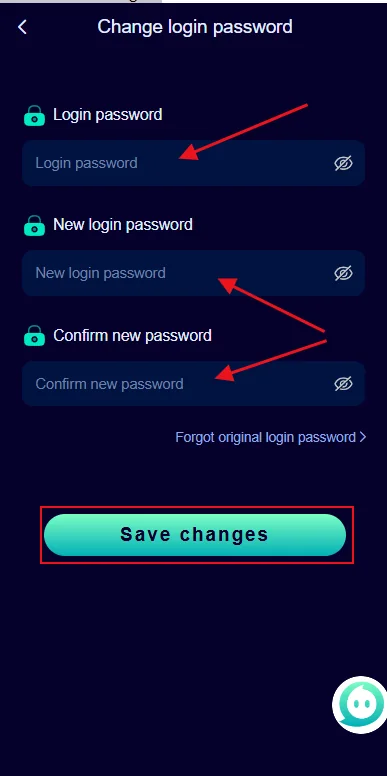
Jalwa Game change login password screen
Password-change capture: old, new and confirm-password fields visible hain.

Login password change karne ka clean flow

Provided capture me old login password, new login password aur confirm-new-password fields visible hain. Password update se pehle current account confirm karein. New password ko unique rakhein aur confirmation field me same value enter karein.

Password manager ya private secure note ka use helpful ho sakta hai, lekin password ko chat, public note ya shared device ke plain text me save na karein. Change complete hone ke baad old password work na kare to expected behavior ho sakta hai.

New device par login ke baad wallet aur profile details ko previous record se compare karna useful hai.
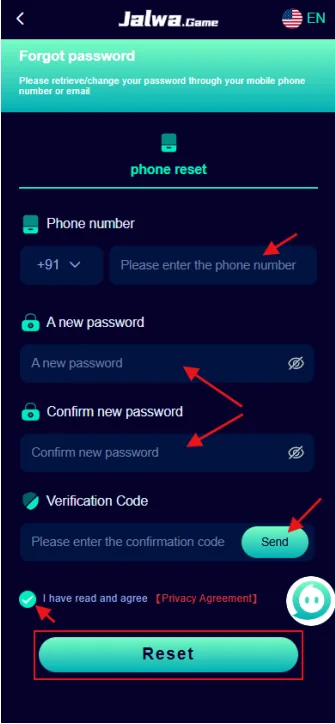
Jalwa Game forgot password screen with phone verification
Recovery capture: phone, new password, confirm password and verification-code fields visible hain.

Forgot password me verification code ka role

Forgot-password capture me phone reset, phone number, new password, confirm new password aur verification code ke fields dikhte hain. Code late aaye to baar-baar different codes enter karne ke bajay latest message ka code use karein.

Registered phone accessible na ho to random new number se reset try karna account mismatch create kar sakta hai. Support route use karte waqt account-identifying details ka minimum required set share karein; password aur OTP private rakhein.

Login issue ko step-by-step isolate karein

Sabse pehle registered number confirm karein. Uske baad password manually type karein, network stable rakhein aur app/session ko reopen karke check karein. Ek hi time par multiple changes karne se actual cause identify karna difficult ho jata hai.

Account temporarily locked feel ho to repeated rapid attempts avoid karein. Recovery option available ho to current registered number par code receive karke new password set karein. Login successful hote hi profile aur wallet details match karein.

Error ka screenshot save karna useful hai, lekin personal number ya balance ko public group me share karne se pehle mask karna better hai.

Number check

Registered phone + correct country code.

Password check

Current password + no accidental spaces.

Recovery check

Newest verification code + matching new password.

Account security habits

Same password ko multiple gaming accounts par reuse karna avoid karein. Password me predictable name, birth year ya simple number sequence use na karein.

OTP sirf verification ke liye hota hai. Koi person support ke naam par OTP ya UPI PIN maange to action stop karein. Account recovery complete hone ke baad suspicious session ho to password dobara change karein.

Public Wi-Fi ya shared device par account open kiya ho to session close karna aur saved credentials remove karna sensible hai.

Private credentials

Password, OTP, PIN and bank login share na karein.

Device check

Shared device par saved login disable karein.

History check

Unexpected wallet movement mile to transaction history verify karein.

Jalwa Game Login FAQ

Jalwa Game login me number accept na ho to kya check karein?

Country code, registered phone number aur accidental spaces check karein. New account ka number old account login me use na karein.

Password incorrect aaye to kya karein?

Current password carefully type karein. Yaad na ho to forgot-password flow use karein; repeated random attempts avoid karein.

Forgot-password code late aaye to kya karein?

Network stable rakhein, resend ke baad newest code use karein aur multiple old codes mix na karein.

Password change karte waqt kya dhyan rakhein?

Old password correct ho aur new password confirmation exactly match kare. Unique password use karein jo kisi aur account par use na ho.

OTP support ko dena chahiye?

Nahi. OTP, password, UPI PIN aur bank-login credentials private rakhein.

Login ke baad first check kya hai?

Profile/account identity aur wallet balance ko previous record se compare karein, especially new device par.

Login failure ko four separate buckets me samjhein

1. Account-detail mismatch

Wrong registered number, old password or country-code mistake basic causes hain. Account details ko memory se guess karne ke bajay known registration record se compare karein. Phone number me extra zero or space bhi mismatch create kar sakta hai.

2. Verification delay

OTP or verification code delayed ho to older and newer messages mix na karein. Resend ke baad newest code use karein. Rapid repeated requests temporary delay create kar sakte hain, isliye stable network and short wait useful hai.

3. Device/session issue

New phone, app update or long-inactive session ke baad saved credentials outdated ho sakte hain. Manual login test karein. App open ho lekin account state wrong ho to profile and wallet compare karein before payment action.

4. Security concern

Unknown password change, unexpected wallet movement or unrecognized login ka sign mile to recovery immediately run karein and password unique value se replace karein. OTP or password kisi support person ko share na karein.

Password reset ke baad consistency check

Reset successful hone ke baad new password se fresh login test karein. Old password intentionally fail hona expected hai. Account open hone ke baad registered number, profile and wallet history match karein. Agar recovery complete hui but different account open hua, further wallet action stop karke account identity verify karein.

Password reset ko payment issue ka shortcut na samjhein. Deposit pending or withdrawal pending ho to transaction evidence separately track karein. Login recovery sirf access fix karta hai; wallet processing automatically change nahi karta.

Three real-world login scenarios

Scenario A: password suddenly incorrect

First confirm you are using the same registered number and no old saved password is auto-filled. Try manual entry once. If still incorrect, use the recovery flow instead of repeated guesses. After reset, confirm profile and wallet identity before any payment action.

Scenario B: verification code arrives late

Keep network stable and wait for the most recent code. If resend is used, older codes may stop working. Enter only the newest code and avoid forwarding it to anyone. A support contact does not need the OTP to explain a login problem.

Scenario C: login works but wallet looks different

Stop before depositing or playing. Compare account phone, profile, game history and transaction history with your known records. A different wallet state can indicate wrong account access or unsynchronised data. Account identity should be confirmed first.

What to record before contacting support

Useful record: masked phone, device model, approximate time, exact error text and whether recovery code was received. Do not include password, OTP or bank credentials. This gives enough context to distinguish account mismatch, recovery delay and device/session issues.

Login mistakes that are easy to prevent

Saved passwords can become stale after a reset. If the device automatically fills an older value, manual entry is a useful check. Likewise, a phone number copied with spaces or an incorrect country code can make a valid account appear unavailable.

Recovery codes should be treated as single-use secrets. Do not paste them into chat groups or screenshots. If multiple codes arrive, use the most recent one and allow enough time for the reset to complete before testing the new password.

After a successful recovery, avoid immediately changing many account settings. First confirm profile identity, wallet state and transaction history. If those look correct, continue normally. If they do not, stop and document the mismatch.

Login checklist before any wallet action

  • Correct registered phone is visible.
  • Current password has been tested once manually.
  • Recovery code, if used, was the newest one.
  • Profile identity matches the expected account.
  • Wallet and transaction history look familiar.
  • No unknown session or suspicious credential request is present.