Jalwa Game account, app and wallet information18+ • Play within a fixed budget
Cash-out checks

Jalwa Game Withdrawal: Bank Account & Pending Status

Withdrawal request me receiving-bank details, amount and history record ko carefully verify karein.

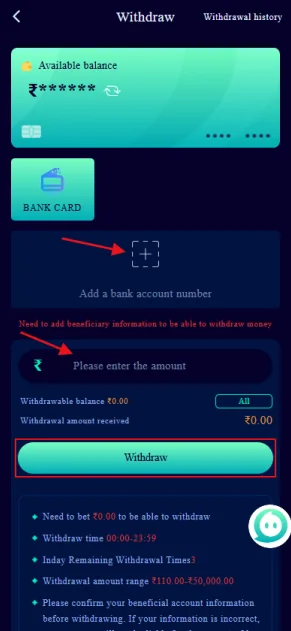
Jalwa Game withdrawal screen with bank account and amount
Withdrawal capture: available balance, bank route and amount field visible hain.

Withdrawal request se pehle balance and bank route

Provided capture me available balance card, BANK CARD option, account-add area and amount field dikhte hain. Request amount current available balance and any displayed limit ke context me verify karein.

Submit se pehle receiving bank detail correct hona critical hai. Wrong recipient or account number delay or failed transfer create kar sakta hai.

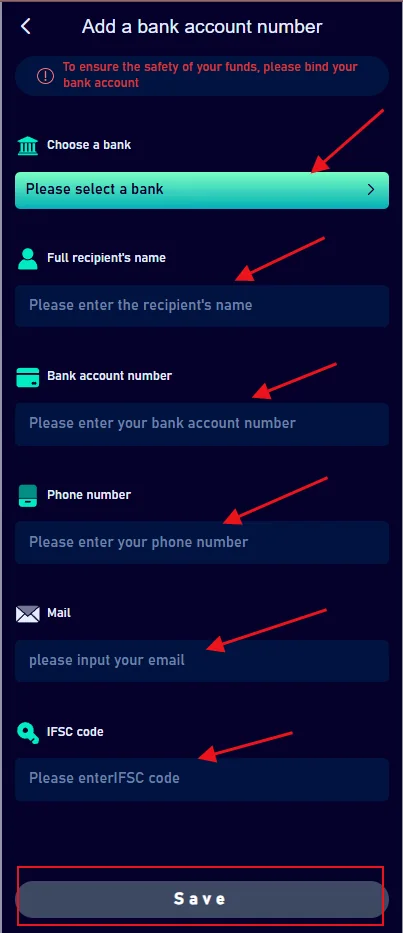
Jalwa Game add bank account screen
Bank capture: bank selection, recipient name, account number, phone, email and IFSC-style fields visible hain.

Bank account fields me mismatch avoid karein

Provided bank capture me bank selection, full recipient name, account number, phone, email and IFSC-style code fields visible hain. Recipient name ko bank record ke according enter karein.

Account number submit se pehle digit-by-digit compare karna worthwhile hai. Sensitive full bank details ko public screenshot me expose na karein.

Pending withdrawal ko track karna

Withdrawal history me request time and status compare karein. Pending state ho to existing request ka record save rakhein before creating another one.

Bank-side delay, account verification or processing queue possible factors ho sakte hain. Exact reason current status/support response se hi confirm hoga.

Support message me amount, request time, masked bank detail and screenshot include karein; OTP or PIN nahi.

Request

Amount + time.

Bank

Masked recipient data.

History

Pending/completed/failed status.

Withdrawal aur responsible play

Withdrawal ko loss-recovery strategy na banayein. Financial outcome unpredictable ho sakta hai, isliye play amount and cash-out expectations realistic rakhein.

Essential funds ko gaming wallet me hold karna avoid karein. Budget and session limits pehle decide karna better hai.

Unexpected wallet movement dikhe to further payment action stop karke transaction history check karein.

No chasing

Loss ke baad extra amount avoid.

Protect funds

Essential money separate rakhein.

Check history

Unexpected movement ko investigate karein.

Jalwa Game Withdrawal FAQ

Withdrawal screen me kya visible hai?

Provided capture me available balance, bank-account add option and withdrawal amount field visible hain.

Bank account add karte waqt kya check karein?

Bank name, recipient name, account number, phone and IFSC-style code carefully verify karein.

Withdrawal pending ho to kya save karein?

Request amount, exact time, bank account masked detail and withdrawal-history screenshot useful hain.

Same withdrawal baar-baar submit karna chahiye?

Existing request status verify kiye bina repeat avoid karein.

OTP ya bank password support ko dena chahiye?

Nahi. OTP, PIN, password and bank login private rakhein.

Wrong bank details submit ho gayi to kya karein?

Further action stop karke current support route use karein and request status verify karein.

Bank detail validation ko transaction step samjhein

Receiving-bank data ek small typo se fail ho sakta hai, isliye bank name, recipient name, account number and IFSC-style code ko submit se pehle compare karein. Copy-paste ke baad bhi beginning and ending digits manually verify karna useful hai.

Available balance

Withdrawal amount available balance and current displayed limits ke context me enter karein. Wallet me visible balance aur withdrawable balance same ho, ye assume na karein if app separate values dikhata ho.

Existing request

Pending request ho to duplicate withdrawal create karne se pehle status check karein. History screenshot and request time save karein.

Receiving bank

Bank processing time Jalwa app status se different ho sakta hai. App completed state and bank credit time mismatch ho to both records note karein.

Wrong details or suspicious support request

Wrong bank detail notice ho to further action stop karein and current support route use karein. Koi person OTP, PIN or bank login maange to share na karein.

Withdrawal ko gaming result control karne ka tool na samjhein. Responsible budget and stop limits financial exposure ko reduce karne ke liye important hain.

Withdrawal scenarios and what to verify first

Request stays pending

Check the exact request time and current history state. Keep the masked bank detail and amount ready. Avoid creating another request until the existing status is understood.

App shows completed but bank has no credit

Record the app completion time and check the receiving bank statement after an appropriate interval. App completion and bank posting can be separate events. If contacting support, provide both states without sharing bank-login credentials.

Bank detail was entered incorrectly

Stop further withdrawal attempts and use the current support route. Do not expose full account credentials publicly. The sooner the mismatch is noticed and documented, the clearer the support request can be.

Protecting the receiving account

Use an account you control and verify recipient name and number carefully. OTP, PIN and full bank-login details are not required for a normal withdrawal-support explanation.

Withdrawal detail errors are easier to prevent than fix

Recipient-name mismatch, one wrong account digit or an incorrect bank code can create avoidable delay. The bank-account capture shows several fields, so completing them slowly and comparing with the bank record is worthwhile.

Before creating a request, review available balance and any current limit shown in the app. After submit, save the request time and current status. This establishes a clear record if the receiving bank does not show the credit later.

If a request is already pending, keep it as one tracked case. Creating several requests can make it harder to know which amount or timestamp support is discussing.

Withdrawal checklist

  • Recipient name matches bank record.
  • Account number was checked twice.
  • Bank or IFSC-style code is correct.
  • Requested amount is within displayed balance/limits.
  • Request time and history state are saved.
  • No OTP, PIN or bank password is shared.

Withdrawal completion has two checkpoints

The first checkpoint is the status shown in Jalwa withdrawal history. The second is the receiving-bank credit. A request can move through different states before the bank entry appears, so keeping both timestamps helps distinguish platform status from bank posting time.

If the app and bank records disagree, document the difference rather than sharing secret banking credentials. A masked statement line, request time and amount are more appropriate evidence than a password or OTP.

What not to do during a pending withdrawal

Do not create repeated requests without checking the existing one. Do not change bank details mid-case unless the current flow specifically requires correction. Do not share OTP, bank PIN or login credentials with anyone who says they can accelerate the transfer.

Keep the original request amount, time and masked bank information together. If status changes, record the change time as well. A clean timeline is more useful than multiple screenshots with no context.

Keep cash-out records separate

Withdrawal history should be tracked independently from deposit history so amounts and timestamps are not mixed. One simple record for each request—amount, time, status and masked bank destination—creates a clear timeline if support is needed later.