Jalwa Game login, app, games and wallet information18+ • Play within a fixed budget
Login troubleshooting

Jalwa Game Login Not Working – Phone, Password & OTP Checks

Jalwa Game login not working ho to phone, password, OTP, recovery and browser/session issues ko one by one isolate karein instead of repeated random attempts.

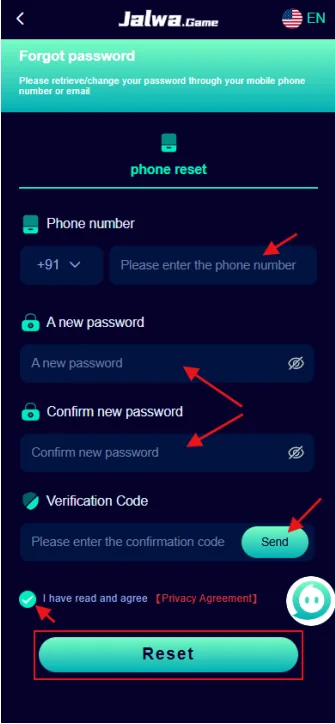
Jalwa Game forgot password screen with phone verification and new password fields
Recovery screen: phone, new password and verification-code fields visible hain.

Jalwa Game login not working: issue ko category me divide karein

Login failure ko random retries se solve karne ke bajay identify karein ki problem phone number, password, OTP, network, browser session or account recovery me hai. Har category ka evidence different hota hai.

Normal account-flow details ke liye Jalwa Game Login page use karein. Ye article specifically “login not working” state par focused hai.

Password, OTP, UPI PIN or banking credential support evidence nahi hote. Unhe private rakhein.

1. Registered phone verify karein

Country code, digits and saved auto-fill value compare karein. Old phone number or accidental space login failure create kar sakta hai. New account banane se pehle confirm karein ki existing account ka correct number use ho raha hai.

2. Password and auto-fill check

Browser or password manager outdated password insert kar sakta hai. Manual typing try karein. Password reset recently hua ho to old saved credential clear karein.

3. OTP and verification

Multiple OTP requests me newest code use karein. Code late aaye to expired older code reject ho sakta hai. Device time, mobile signal and SMS filtering notice karein.

4. Network and session state

Blank screen or endless loading me stable network try karein. Browser cache issue ho to fresh private tab useful diagnostic ho sakta hai. Payment action tab tak avoid karein jab tak account dashboard fully load na ho.

Login issue ka clean support record

  • Exact error text or screenshot.
  • Date and exact time.
  • Device model and browser/app context.
  • Registered number ka masked version.
  • Recovery attempt hua ya nahi.

Account open ho jaye lekin wallet state unexpected ho to deposit and withdrawal history separately verify karein.

Login symptom → likely check

SymptomCheck firstDo not do
Password rejectedManual entry / recent resetCreate random second account
OTP missingSignal, newest request, SMS filteringShare code with helper
Blank after loginNetwork, fresh session, device timeDeposit to “test” account
Wrong profileRegistered phone and sign-out stateContinue financial actions

One-variable-at-a-time troubleshooting

Ek hi attempt me password reset, browser change, network change and new OTP request sab karne se actual cause unclear ho jata hai. First registered number verify karein, then password, then OTP/recovery, then browser/network state. Har step ka result note karein.

Saved-password conflict

Password recently changed ho to browser old password automatically fill kar sakta hai. Auto-fill disable karke new password manually type karein. If login works, saved entry update karein.

OTP request loop

Rapid requests multiple codes create kar sakte hain. Newest request ka code use karein. Code late aaye to older value invalid ho sakti hai. Verification code kisi support person ko forward na karein.

Login works but account looks unfamiliar

Phone/profile context confirm karein. Wrong session or wrong number ho sakta hai. Wallet or withdrawal action stop karke identity verify karein. Unknown activity ho to password security first.

When to move from self-check to support

Correct registered number, current password/recovery and stable network ke baad same error repeat ho, to exact error screenshot and timestamp save karein. Support message me device, app/browser context and masked number enough hai. Secret credentials unnecessary hain.

Detailed login scenarios

Phone number accepted, password rejected

Caps/character entry, auto-fill and recent password reset check karein. Saved credentials remove/update tabhi karein jab new password confirm ho.

Password accepted, OTP step fails

Newest code, signal and device time check karein. Multiple OTP requests ke beech old code use na karein. Verification screen ko close/reopen karne se request state change ho sakti hai; exact error note karein.

Login completes but dashboard loops

Network switch comparison and fresh browser/app session useful hai. Wallet action test mat karein. If browser works but app loops, app-specific article use karein.

Forgot-password screen does not recognize phone

Country code/number format and whether account same number se register hua tha verify karein. New registration create karna existing wallet/history recover nahi karta.

Security after unexpected login failure

If failure suddenly start hua without password change, account activity and recent sessions inspect karna sensible hai where available. Recovery complete ho to unique password set karein and shared-device saved credentials clear karein.

Support contact ko identity prove karne ke naam par OTP/password dena avoid karein. Masked account identifier, error screen and timestamp usually safer evidence hain.

What success looks like

Correct profile opens, wallet/history expected state show karti hai, and repeated error disappear hota hai. Sirf login button response milna enough confirmation nahi if wrong profile/session open ho.

Login recovery checklist before contacting support

  1. Registered phone digits verified.
  2. Current password manually tried.
  3. Latest OTP only used.
  4. Network stable and device time correct.
  5. Fresh browser/app session tested.
  6. Error text and exact time saved.

If these checks fail, support ko concise facts send karein. “Login nahi ho raha” alone se diagnosis difficult hota hai; exact error or stage more useful hai.

What not to change repeatedly

Phone number, password, OTP request, browser, network and account registration sab simultaneously change na karein. One change per test cause identify karne me help karta hai. New account banana recovery shortcut nahi.

After recovery

Profile, wallet and history review karein. Unknown activity ho to password unique rakhein and shared-device sessions avoid karein. Account access stable hone ke baad hi deposit/withdrawal action consider karein.

Login problem examples by stage

Before submit: phone/password field issue. After submit: OTP or credential error. After successful verification: blank dashboard or wrong profile. Stage identify karne se correct page and evidence choose hota hai.

If wrong profile opens, logout before any wallet action. If blank dashboard appears, stable network and fresh session compare karein. If OTP fails, newest request and registered number verify karein. Har stage ka solution different hai.

Support-ready summary example

“Registered number ending **42, Android device, login attempted 10:15 PM, password accepted but OTP screen shows X error; fresh network tested.” Is level ka factual summary useful hai without password or OTP reveal kiye.

Issue resolve hone ke baad saved credentials update karein and same account profile/wallet confirm karein.

Login failure ko repeatable test me convert karein

Same device, same network and same credentials ke saath one controlled attempt karein and exact result note karein. Then only one variable change karein—network, browser/app session or recovered password. This approach random retries se better signal deta hai.

If error message changes

New error text save karein. “Invalid password” se “OTP required” shift hona progress indicate kar sakta hai; blank page se wrong profile shift different layer show karta hai.

If no error appears

Button response, loading spinner, redirect and final URL/state notice karein. Silent failure bhi evidence hai if exact time and device context recorded ho.

Account identity is the finish line

Successful login ka final check correct profile, wallet and expected history hai. Wrong profile open ho to technically login successful hai but user task complete nahi hua. Financial action tab tak pause karein.

Recovery complete hone par password manager me stale entry update karein. Shared device par sign-out and saved credential cleanup privacy improve karta hai.

Final login check before retry

Phone number expected account ka hai, password current hai, newest OTP request clear hai and network stable hai—ye four checks confirm karke one controlled retry karein. If result same hai, error evidence save karke support step par move karein rather than rapid repeated attempts.

Account access milne ke baad first financial action se pehle profile and wallet verify karna final safety check hai.

Final login retry checklist

Retry se pehle registered phone, current password, newest OTP request aur stable network ek baar final verify karein. Agar same error repeat hota hai, exact message aur timestamp save karke random rapid attempts stop karein. Recovery successful hone ke baad correct profile, wallet aur history open ho rahe hain ya nahi confirm karein. Successful button response se zyada important correct account state ka load hona hai.

Jalwa Game Login Not Working – Phone, Password & OTP Checks FAQ

Short answers common questions ko clear context me cover karte hain.

Jalwa Game login not working ho to first check kya hai?

Registered phone and current password verify karein, then network and browser/app state check karein.

OTP nahi aa raha ho to kya karein?

Newest request ka wait karein, phone network and message filtering check karein, and OTP kisi person ko share na karein.

Forgot-password ke baad old password chalega?

Password reset complete hone ke baad new password use karein; browser auto-fill old password insert kar sakta hai.

Same number par multiple attempts safe hain?

Repeated rapid attempts temporary lock or confusion create kar sakte hain. Error message note karke controlled retry karein.

Browser me login ho aur app me nahi ho to kya compare karein?

Same account, app version, network, saved credentials and device time compare karein.

Login support ko kya bhejna chahiye?

Error message, time, device model and registered number ka masked version. Password or OTP nahi.