Jalwa Game account, app and wallet information18+ • Play within a fixed budget
Wallet funding

Jalwa Game Deposit: UPI, Amount & Pending Checks

Deposit action se pehle selected channel, amount and payment proof ko clearly verify karein.

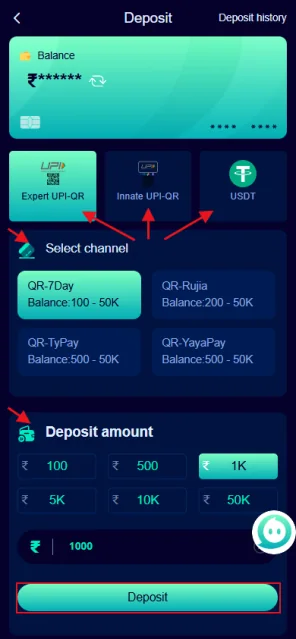
Jalwa Game deposit screen with payment channels and amount options
Deposit capture: channel choices and preset amounts visible hain.

Deposit screen me three critical details

Provided capture me balance card, payment-channel options, preset amount buttons and Deposit action visible hain. Channel label and amount submit se pehle read karein.

Wallet funding ke baad transaction reference save karein. Amount deduct ho lekin wallet update na ho to duplicate payment se pehle status verify karein.

Pending deposit ko calmly check karein

Payment-app status, bank debit, transaction reference and Jalwa wallet balance ko compare karein. In chaar records me mismatch issue identify karne me help karta hai.

Payment success ho lekin wallet pending ho to exact time and reference ID note karein. Support message me concise detail dena useful hai.

Repeated rapid deposits se proof mix ho sakta hai. Har transaction ka separate record rakhna better hai.

Bank/UPI

Debit status.

Reference

Transaction ID.

Wallet

Credit status.

Deposit safety

Payment destination current app screen se verify karein. Random message, unknown QR or personal account instruction ko blindly follow na karein.

UPI PIN and OTP kisi person ko share na karein. Support ko proof chahiye ho to transaction reference and screenshot enough ho sakte hain; secret credentials nahi.

Budget limit deposit se pehle decide karein. Loss ke reaction me immediate extra deposit avoid karna responsible play ka important part hai.

Destination

Current in-app route.

Credentials

PIN/OTP private.

Budget

Pre-decided limit.

Jalwa Game Deposit FAQ

Deposit screen me kya visible hai?

Provided capture me multiple payment channels, deposit amount presets and Deposit action visible hain.

Payment successful but wallet unchanged ho to kya karein?

Reference ID, time, amount and wallet status compare karein. Same payment repeat karne se pehle first transaction state confirm karein.

Deposit proof me kya save karein?

Amount, transaction reference, exact time and status screenshot useful hain.

UPI PIN support ko dena chahiye?

Nahi. UPI PIN, OTP, password and bank login credentials private rakhein.

Wrong amount enter ho gaya to kya karein?

Submit se pehle digits confirm karein. Completed transaction ko reverse karna current payment rules par depend karega.

Channel unavailable ho to kya karein?

Current app me available alternatives check karein; unknown payment address par manually transfer avoid karein.

Deposit reconciliation ka simple method

Reconciliation ka matlab payment-app record and Jalwa wallet record compare karna. Payment-app success ho, bank debit ho and wallet credit bhi ho to transaction aligned hai. Inme se koi state missing ho to reference ID ke saath pending case treat karein.

Before payment

Current deposit route, amount and recipient/UPI context verify karein. Old screenshot or forwarded QR ko current destination na samjhein. Current app interface ko priority dein.

After payment

Success screen close karne se pehle transaction reference save karein. Amount and exact time note karein. Wallet refresh ke baad credit check karein.

If wallet is pending

Same amount immediately repeat na karein. Duplicate payment additional reconciliation problem create kar sakta hai. Existing transaction proof ready rakhein and current support flow use karein.

Budget before deposit

Deposit amount entertainment budget ke andar hona chahiye. Previous loss recover karne ke liye extra deposit decision risk increase karta hai. Essential funds separate rakhna better hai.

UPI PIN or OTP kisi support conversation ka proof nahi hai. Secret credentials private rakhein. Masked screenshot and transaction reference enough evidence ho sakte hain.

Deposit scenarios and the correct evidence

Bank debited, wallet pending

Save the transaction reference, exact time and amount. Check the payment-app state and Jalwa transaction history. Do not immediately repeat the same payment because a duplicate debit can create a second issue.

Wallet credited but amount looks different

Compare the exact amount sent and any displayed transaction entry. If a fee, bonus or adjustment is shown, read the current in-app description rather than assuming the reason.

Payment channel disappears

Availability can change. Use only a route currently presented in the app. Do not send money to an old QR, old address or person just because it worked previously.

Record keeping

For each payment keep one line containing date, time, amount, reference and wallet state. Separate records make later reconciliation easier and reduce confusion when multiple deposits exist.

Deposit mistakes that create avoidable disputes

Using an old payment route is one of the easiest mistakes to avoid. Always rely on the destination currently shown in the app. A saved QR or forwarded address can become outdated even if it worked previously.

Another common problem is losing the transaction reference. Before closing the payment confirmation, save the reference and exact amount. If the wallet does not update, those two details are far more useful than repeating the payment.

Budget pressure can also create bad decisions. A previous loss should not determine the next deposit amount. Deposit limits should be set before the session, using money that is not needed for bills, debt or emergency expenses.

Deposit checklist

  • Current in-app payment route is selected.
  • Amount is checked before confirmation.
  • Transaction reference is saved.
  • Wallet balance is checked after payment.
  • Pending payment is not immediately duplicated.
  • UPI PIN and OTP remain private.

Deposit status should be confirmed from two sides

The payment side tells you whether the bank or UPI transaction was successful, pending or failed. The Jalwa wallet side tells you whether the balance was credited. Both records matter. One successful state does not automatically prove the other side has completed.

If the two sides disagree, preserve the reference and wait for a clear status before repeating the payment. This reduces duplicate debits and makes any later support conversation easier to understand.

What not to do during a pending deposit

Do not send the same amount again just to test the wallet. Do not move to an old payment route from a screenshot. Do not give an OTP or UPI PIN to anyone claiming they can manually credit the wallet. First preserve the reference, check the current status and use the current support route.

If the payment later resolves, update your own record so the same transaction is not treated as unresolved again. Keeping one clean entry per deposit is a simple way to avoid confusion.

Separate deposit history from game history

Deposit proof belongs with transaction history, not game-result history. Keeping these records separate prevents a wallet-credit problem from being confused with a round-result dispute. When checking a missing credit, focus on payment time, reference and wallet entry first.

If balance is correct after reconciliation, no further deposit action is needed. If it is not, preserve evidence and use the current support route rather than attempting repeated payments.