Jalwa Game account, app and wallet information18+ • Play within a fixed budget
Support checks

Jalwa Game Customer Care: Account & Payment Support

Login, app, deposit, withdrawal and account issues ko structured detail ke saath support tak le jana easier hota hai.

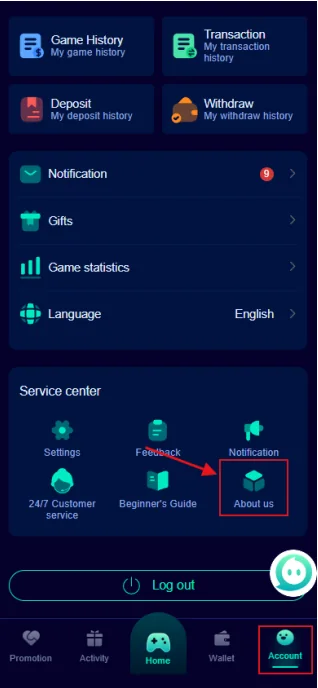
Jalwa Game account service center options
Service capture: settings, feedback, notification and customer-service shortcuts visible hain.

Service-center capture me kya visible hai

Provided capture me Settings, Feedback, Notification, customer-service style option, beginner info and About Us shortcuts visible hain. Current app version me names or placement change ho sakte hain.

Support open karte waqt correct Jalwa account context and issue type ready rakhein. Generic “money missing” message se better exact amount, time and reference dena hota hai.

Support message ka useful format

Start with issue type: login, register, app, deposit, withdrawal or security. Next exact date/time, device and what you expected versus what happened mention karein.

Payment case me amount and transaction reference include karein. Screenshot me personal banking info mask karein.

Account-access case me registered phone ka masked version enough ho sakta hai. Full password or OTP never include karein.

Issue

One clear category.

Evidence

Reference + screenshot.

Privacy

Mask sensitive data.

High-risk requests ko identify karein

Koi support contact OTP, UPI PIN, card CVV, full bank password or remote-control access maange to action stop karein.

Guaranteed refund, guaranteed win or urgent extra deposit ke pressure ko trust signal na samjhein.

Suspicious access ke baad password change, account history and wallet history verify karna sensible next step hai.

Never share

OTP/PIN/password.

No pressure

Urgent deposit claims avoid.

Recover

Password + history check.

Jalwa Game Customer Care FAQ

Customer care ko kya detail bhejein?

Issue type, exact time, device, amount if relevant, transaction reference and screenshot useful hain.

Password ya OTP share karna chahiye?

Nahi. Password, OTP, UPI PIN and bank-login detail private rakhein.

Deposit issue ka proof kya hai?

Payment reference, amount, payment time and wallet status screenshot useful hai.

Withdrawal issue me kya mention karein?

Request amount, time, masked bank detail and current withdrawal status mention karein.

App issue me kya detail useful hai?

Device model, app version, network type and exact error state useful ho sakte hain.

Support response suspicious lage to kya karein?

Sensitive detail na dein, payment stop karein and account password/security state verify karein.

Support request ko resolution-ready banayein

Clear request me four elements useful hote hain: issue category, exact time, evidence and current status. “Deposit problem” ke bajay “₹X amount at HH:MM, reference ending 1234, bank success, wallet pending” jaisa structured format context clearer banata hai. Sensitive complete numbers public form me avoid karein.

Login issue

Registered phone ka masked version, error text and device model enough context ho sakte hain. Password and OTP include na karein.

Deposit issue

Amount, payment reference, payment time and wallet status. UPI PIN kabhi include na karein.

Withdrawal issue

Request amount, time, masked bank detail and withdrawal-history state useful hain. Bank password or OTP unnecessary and unsafe hai.

App issue

App version, device model, network type and exact error sequence mention karein. Crash se pehle kya action hua tha, ye detail helpful ho sakti hai.

Support impersonation risk

Urgent payment pressure, guaranteed refund, remote device control or secret credential demand strong warning signs hain. Suspicious contact par further interaction stop karein and account password/security history verify karein.

Public comments or social messages me personal transaction data post karna avoid karein. Minimum necessary information share karna safer practice hai.

Support scenarios: what a useful message looks like

Account access

“Registered number ending 42, Android device, login error at 10:35 PM, recovery code received but password reset failed.” This is clearer than sending the password or OTP.

Deposit pending

“Amount ₹X, paid at 9:20 PM, reference ending 8841, bank success, wallet still pending.” This gives the essential transaction context while keeping secret credentials private.

Withdrawal pending

“Requested ₹X at 6:40 PM, bank ending 2210, withdrawal history pending.” Again, no OTP or PIN is needed.

When support advice should be questioned

Be cautious if someone asks for remote-control access, a new deposit to unlock an old payment, a personal UPI transfer, password, OTP or bank PIN. Stop and verify account security before taking further financial action.

Good support evidence is specific, not sensitive

Specific means the message identifies what happened, when it happened and what state is visible now. Sensitive means passwords, OTPs, PINs and complete banking credentials. The first category is useful; the second should remain private.

For app problems, include device model and what action triggered the error. For payments, include amount and reference. For account access, include a masked phone and the exact error wording. This small amount of structured evidence can separate very different problems.

If a support response asks for a payment to “unlock” a transaction, remote-control access or secret credentials, treat that request cautiously. Stop financial action and verify account security before proceeding.

Support checklist

  • One clear issue category.
  • Exact time or approximate time window.
  • Reference ID for payment cases.
  • Masked screenshot where useful.
  • No password, OTP, PIN or bank login.
  • Current status described in one sentence.

One support request should describe one problem

Combining login, deposit, withdrawal and app issues in one long message can make the actual problem harder to follow. Start with the issue that blocks you right now and provide only the evidence relevant to that issue. If another problem remains after resolution, treat it separately.

This approach also protects privacy because you are less likely to send unnecessary account or banking details. The best support record is concise, chronological and limited to what is needed.

How to recognise a useful support response

A useful response addresses the specific issue, refers to the transaction or account state you described and does not ask for secret credentials. It may request a clearer screenshot, masked account information or additional timing details. That is different from asking for a password, OTP or PIN.

If the response does not match your issue, restate the problem in one short chronological message. Avoid sending many unrelated screenshots because they can hide the evidence that actually matters.

Keep a local incident note

For recurring account or payment issues, a simple private note with date, issue type, reference and resolution helps prevent the same case from being reopened with incomplete context. Do not store passwords or OTPs in this note. The goal is chronology, not credential storage.

If the issue resolves, record the resolution time and final status. This makes future comparisons easier if a similar symptom appears again.